






Regular Savings
Saving becomes more profitable with all the conveniences offered by Regular Saving.
Make saving more enjoyable with Regular Savings
Experience the convenience of saving with competitive interest rates and seamless transactions through the app.


No monthly fees

Withdraw funds anywhere, anytime

Low risk

Open an account with no minimum deposit
 NaN
NaNInterest Rate
Effective Date: November 22, 2023
| Product | Balance | Interest Rate |
| Regular Savings | All balance | 0% per year |
How to Add Balance
to Regular Savings
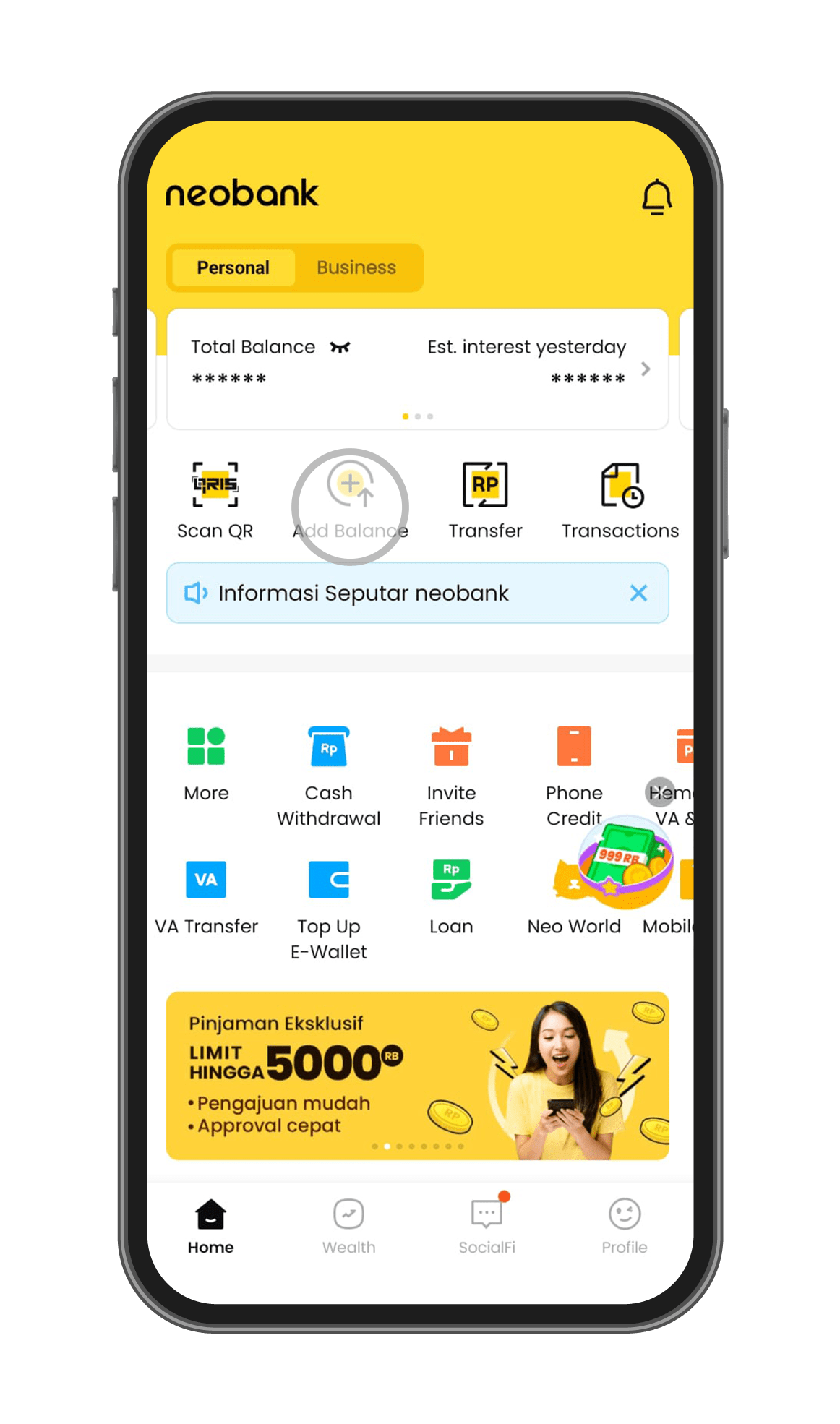
Step 1
Open the neobank application and select "Add Balance."
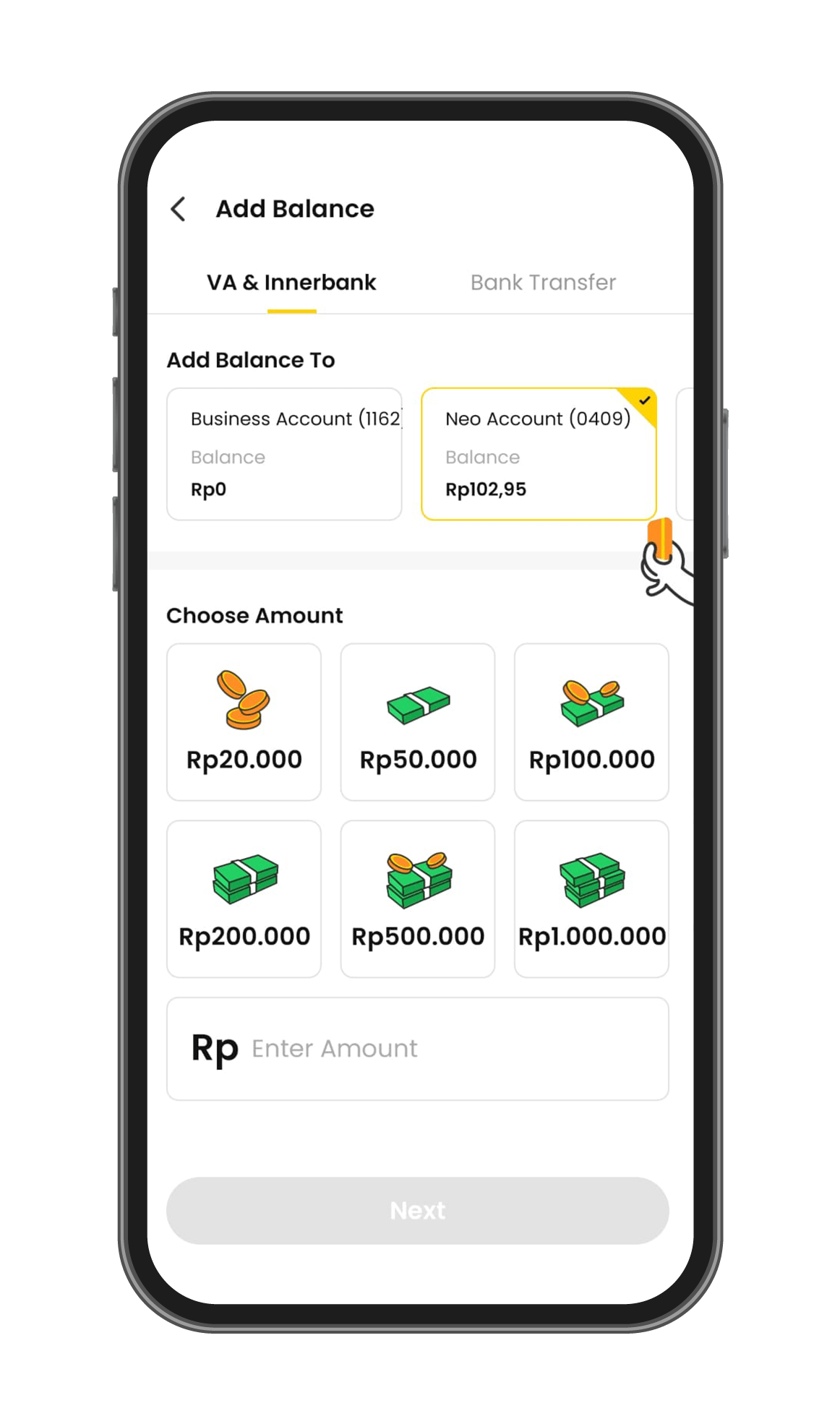
Step 2
Select the top-up method "VA & Innerbank" or "Bank Transfer," choose your Regular Savings account, and enter the amount of money you want to deposit.
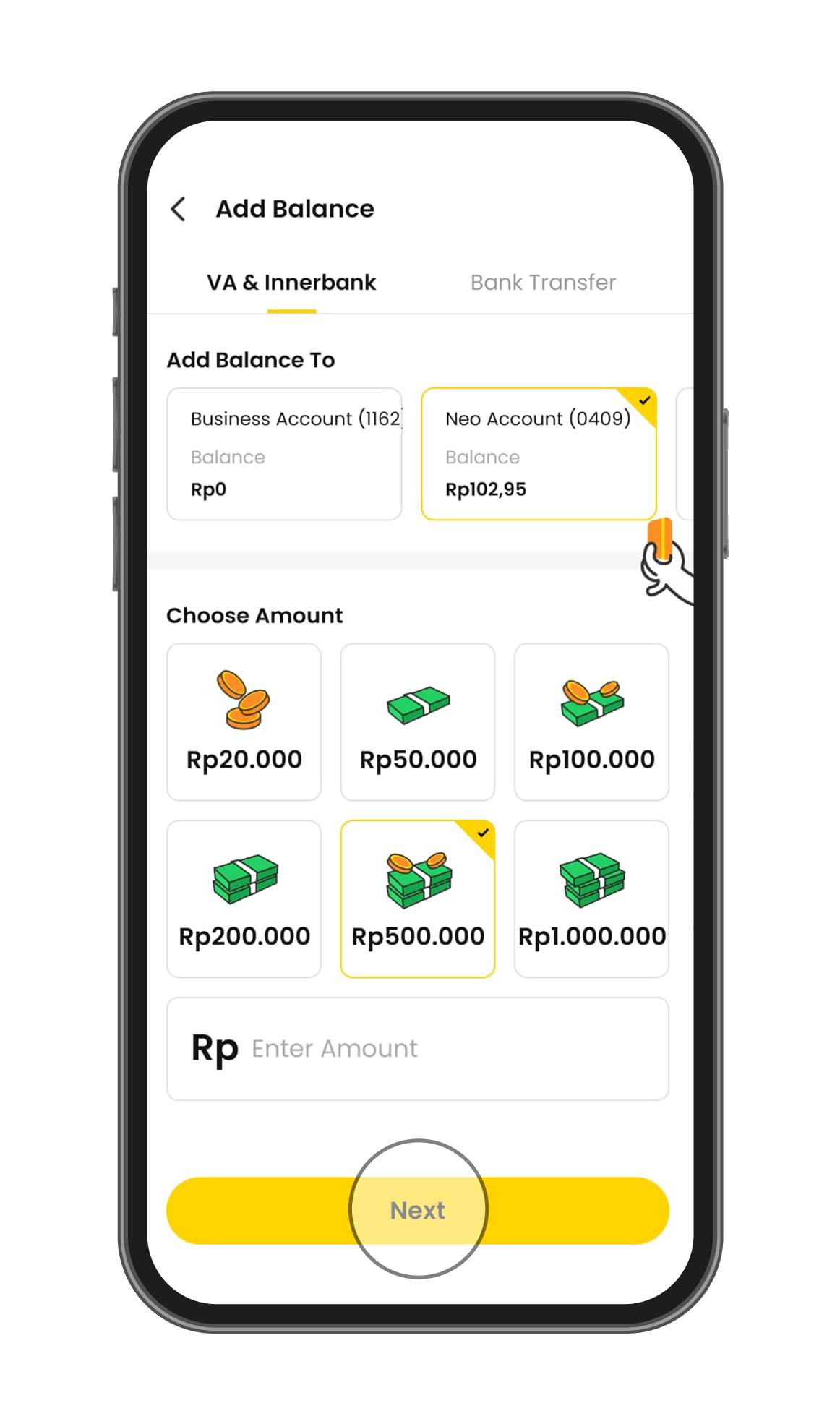
Step 3
Hit "Next."
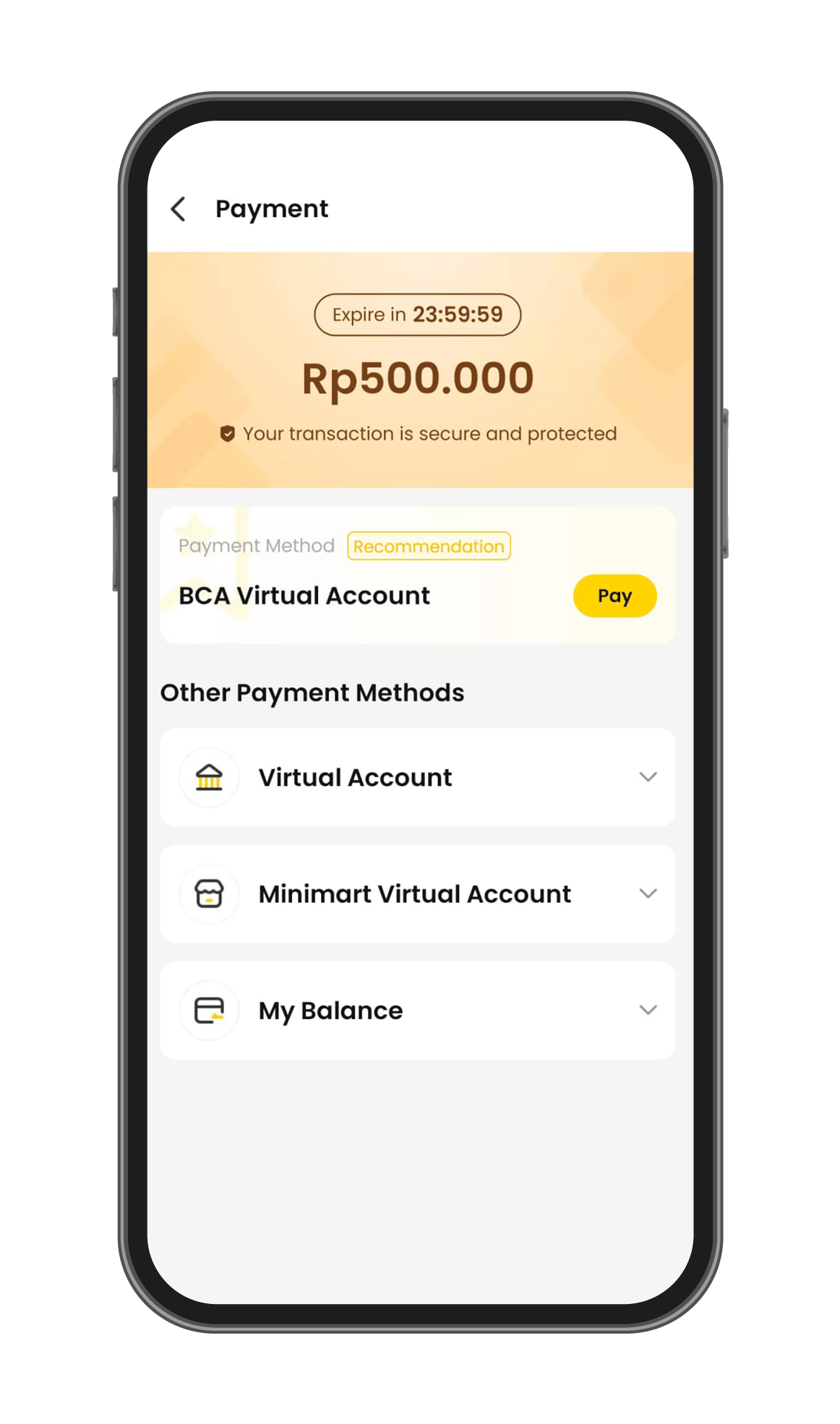
Step 4
Select the payment method and follow the payment instructions to complete the fund addition process.
How to Add Balance
to Regular Savings
Step 1
Step 2
Step 3
Step 4
Open the neobank application and select "Add Balance."
Select the top-up method "VA & Innerbank" or "Bank Transfer," choose your Regular Savings account, and enter the amount of money you want to deposit.
Hit "Next."
Select the payment method and follow the payment instructions to complete the fund addition process.
Terms & Conditions
Tabungan digital yang praktis dan cuan di aplikasi neobank

Aplikasi neobank mempunyai beberapa produk simpanan individu yang dapat dipilih sesuai kebutuhan. Apa saja?
- Tabungan Neo
Tabungan Neo adalah rekening digital utama nasabah. Ketika nasabah berhasil membuka rekening di aplikasi neobank, maka nasabah secara otomatis akan memiliki rekening Tabungan Neo dengan bunga 0,5% per tahun.
Pemilik rekening Tabungan Neo mempunyai akses ke seluruh fitur dan layanan di aplikasi neobank. Sebagai rekening utama, nasabah dapat menggunakan nomor rekening Tabungan Neo untuk transaksi ke sesama nasabah Bank Neo Commerce dan antar bank lain.
.
Fitur dan layanan perbankan di aplikasi neobank
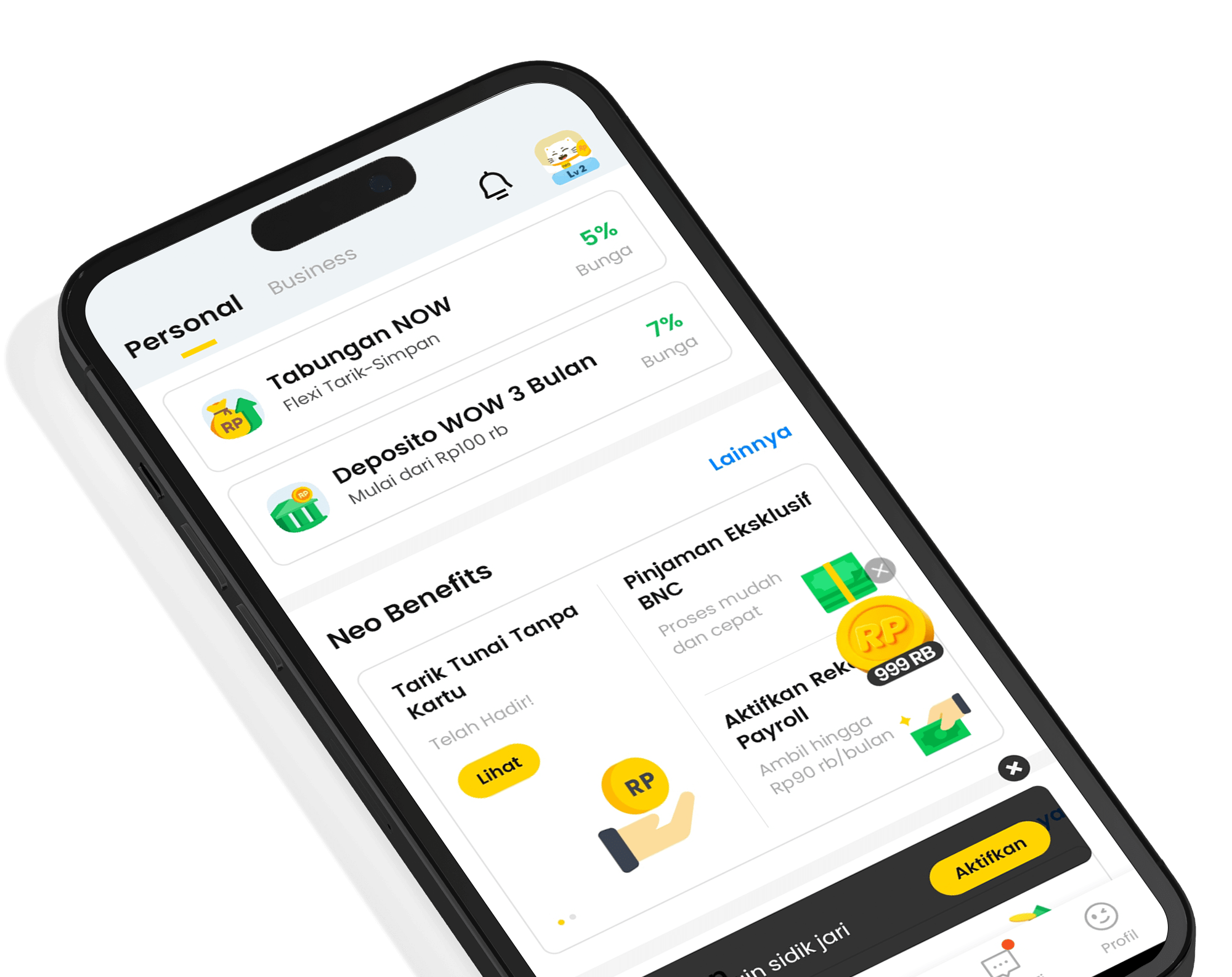
- Tabungan Neo NOW
- Deposito Neo WOW
- Tabungan berjangka Neo Wish
- Pembayaran tagihan
- Top Up e-wallet
- Transfer melalui chat
- Neo Pinjam
- Hematpay Virtual Account dan QRIS
- Neo Emas
- Investasi reksa dana
- Neo Jurnal
- Game
- Kode referral
- Program loyalitas
- Neo Bisnis
- Tabungan Neo NOW
Produk tabungan neobank atau Neo NOW mempunyai banyak kelebihan, di antaranya:
- Tanpa minimum setoran
- Tarik dan simpan uang lebih fleksibel
- Gratis biaya transfer ke bank lain
- Bunga tinggi
- Bebas biaya admin
- Bunga cair setiap hari
3. Deposito Neo WOW
Deposito adalah produk simpanan yang hanya bisa dicairkan pada jangka waktu tertentu sesuai kesepakatan. Bunganya lebih tinggi dari tabungan dan bisa menjadi produk investasi yang aman.
Kelebihan Deposito Neo WOW
- Automatic Roll Over (ROI) atau perpanjang jangka waktu deposito secara otomatis
- Setoran awal kecil mulai dari Rp100.000
- Bebas biaya admin
- Gratis tarik simpan
- Bunga tinggi
- Risiko rendah
Jenis-jenis deposito Neo WOW
- Neo WOW Flexi
Produk deposito yang bisa dicairkan kapan saja tanpa harus menunggu tanggal jatuh tempo.
Opsi tenor dan bunga Neo WOW Flexi
- 1 bulan | bunga 7,5 per tahun (eksklusif untuk pembukaan deposito pertama kali)
- 1 bulan | bunga 6% per tahun
- 3 bulan | bunga 8,5% per tahun (eksklusif untuk pembukaan deposito pertama kali)
- 3 bulan | bunga 7% per tahun
- Neo WOW Instant
Deposito dengan tenor yang relatif singkat dengan bunga yang tinggi.
- 7 hari | bunga 5,5% per tahun
- 1 bulan | bunga 6,5% per tahun
- 3 bulan | bunga 7,5% per tahun
- Neo WOW Extra
Deposito dengan tenor yang lebih panjang dan bunga yang lebih tinggi.
- 6 bulan | bunga 7,75% per tahun
- 12 bulan | bunga 8% per tahun
4. Neo Wish
Neo Wish adalah produk tabungan berjangka yang membantu nasabah untuk mencapai keinginannya. Nasabah menetapkan sendiri target dan jangka waktu tabungan. Dana akan ditarik secara otomatis ke rekening tabungan Neo Wish. Nasabah bisa menarik uangnya meskipun belum jatuh tempo.
Kelebihan Neo Wish
- Bunga tinggi mulai dari 5,5% per tahun
- Bebas menyesuaikan target tabungan
- Bebas biaya admin
- Bebas penalti jika menarik dana sebelum jatuh tempo
Buka rekening di aplikasi neobank dan nikmati berbagai kemudahan perbankan dalam satu genggaman. Download aplikasi neobank di Google Play Store dan App Store sekarang!
***
PT Bank Neo Commerce Tbk terdaftar dan diawasi oleh OJK dan merupakan bank peserta LPS yang menjamin simpanan setiap nasabah hingga Rp2 miliar dengan bunga maksimal 3,5%.




What are you waiting for?
Let's try neobank now!
.png)
.png)

PT Bank Neo Commerce Tbk is licensed and supervised by the Financial Services Authority (OJK) & Bank Indonesia (BI) and is a member of Indonesia Deposit Insurance Corporation (LPS).
The maximum deposit amount insured by LPS per customer per bank is Rp2 billion. To find out the LPS Guaranteed Interest Rate, please access here.
Copyright © 2023, All Rights Reserved, PT. Bank Neo Commerce Tbk


PT Bank Neo Commerce Tbk is licensed and supervised by the Financial Services Authority (OJK) & Bank Indonesia (BI) and is a member of Indonesia Deposit Insurance Corporation (LPS).
The maximum deposit amount insured by LPS per customer per bank is Rp2 billion. To find out the LPS Guaranteed Interest Rate, please access here.


Copyright © 2023, All Rights Reserved, PT. Bank Neo Commerce Tbk